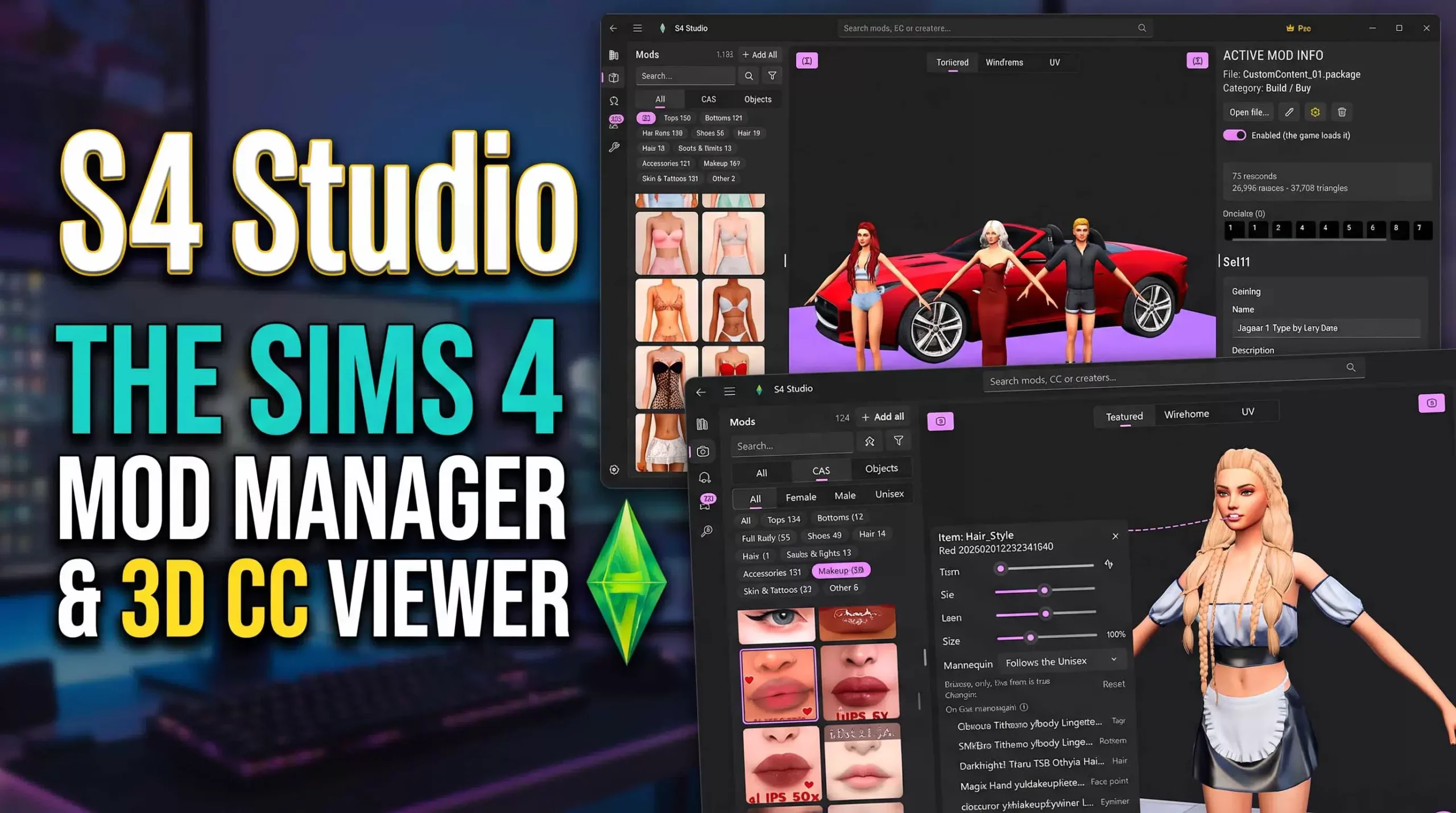
What is S4 Studio and who is it for?
S4 Studio is an all-in-one Sims 4 mod manager and 3D custom content (CC) viewer for Windows, developed for The Sims 4 players. It lists your Mods folder on a single screen, displays CCs in 3D without launching the game, and finds problematic files for you.
Anyone who has used mods for a long time faces the same picture: thousands of .package files, meaningless file names, and a folder where you can’t remember what came from where. Opening and closing the game repeatedly to figure out which hair belongs to which file is both time-consuming and frustrating.
If your Mods folder is out of control, if your game started acting weird after an update, or if you simply want to keep your CC collection organized, S4 Studio is designed exactly for this need. In this article, we detail all the program’s features, the differences between the free and Pro versions, and who it makes sense for.
Mod library: The easy way to organize the Mods folder
At the core of S4 Studio is a mod library that scans your Sims 4 Mods folder along with its subfolders. The program reads both .package and .ts4script files and adds each one to the list.
Instead of reading file names, you see the content: a thumbnail is generated for each mod, and a large preview opens when you hover over it. The library includes the following tools:
- Filtering: Filter by type (CAS, Build/Buy, animation, gameplay mod, script), creator, date added, and status.
- Quick search and favorite lists: Store your frequently used CCs by grouping them.
- One-click enable/disable: Turn mods on or off without the need to manually rename or move files.
- Safe delete: Deleted mods are not permanently destroyed; they go to the Recycle Bin.
Performance is also a key point. The program supports libraries of tens of thousands of mods and opens in under a second after the initial scan. For players with large collections, this means no long waiting times at every launch.
Tip: When you experience a problem in the game, the 50/50 method (disabling mods by half to find the culprit file) can be applied much faster thanks to the one-click enable/disable feature.
3D CC viewer: Preview without launching the game
The program’s most striking feature is the viewer that displays Sims 4 CCs in 3D without starting the game. You no longer have to wait for the Create-a-Sim screen to load to see how a newly downloaded hair or dress looks.
CAS contents
Clothing, hair, makeup, accessories, and skin tones are shown on male and female models. You can switch between all color swatches, combine different CAS parts to create a complete outfit, and save these outfits.
Build/Buy objects
Furniture and decor objects are displayed in 3D with their own models and textures. This way, you can check how a sofa or lamp will look in the game beforehand.
Scene creation and tools for content creators
- Set up scenes with multiple models and objects; move, rotate, scale, undo, and redo.
- Lighting presets, floor styles, and taking screenshots.
- Texture, wireframe, and UV views for content creators.
- Auto-complete missing meshes and textures from your game files.
These features save serious time, especially for players who prepare lookbooks, share CCs, or create their own content.
Problem finder: Detecting broken and duplicate Sims 4 mods
Game crashes, invisible CCs, or broken textures are mostly caused by a few problematic files in the Mods folder. S4 Studio’s problem finder scans these files for you and highlights four main types of issues:
- Duplicate mods: Loading the same content twice.
- Conflicting resources: Different mods trying to modify the same game resource.
- Too deeply nested scripts: The Sims 4 only reads .ts4script files up to one subfolder deep in the Mods folder; deeper scripts will not work.
- Broken or unreadable packages: Incompletely downloaded or damaged .package files.
Once the issues are listed, they can be fixed with one click (this feature is in the Pro version). Especially after a major game update, running this scan is a practical way to catch potential errors before opening the game.
Tray management: Households, Sims, and lots
The Tray folder holds the households, Sims, lots, and rooms you have saved to your library. S4 Studio lists these items with their images so you can browse your saves without entering the game.
The really useful part is that it shows which CCs each household or lot uses. When you want to share a house with a friend, you can export it ready to share along with the necessary CCs. This way, the other party doesn’t encounter missing objects or bald Sims.
You can also save tray images and keep your library clean by deleting saves you no longer need.
Package editor: Modifying CC properties
For those who want to go further, S4 Studio also offers a package editor. With this, you can:
- Edit age, gender, clothing category, Create-a-Sim tags, and flags of CAS parts (for example, making an adult-only outfit available for teens).
- Change the catalog name, description, price, and tags of Build/Buy objects.
- Edit String tables (STBL) and raw resources.
Since an automatic backup is created before every save, you can revert to the original file if you make a wrong change.
Other features
- 19 language support: The interface is available in 19 different languages.
- Windows 11 design: A native interface with light and dark theme options.
- Works completely offline: Your files are never sent anywhere from your computer.
Free version and S4 Studio Pro difference
You can try S4 Studio for free; full management tools are available in the Pro version, offered via a monthly subscription through the Microsoft Store.
| Feature | Free | Pro |
| Browsing mod library | Yes | Yes |
| Viewing problems | Yes | Yes |
| Viewing tray items | Yes | Yes |
| 3D viewer | With a limited number of mods | Unlimited scenes and combinations |
| Full mod management | No | Yes |
| One-click problem fixing | No | Yes |
| Tray export with CC | No | Yes |
| Package editor | No | Yes |
The subscription can be canceled at any time through your Microsoft account. Scanning your library with the free version first to see the problem list is a good way to decide if you need Pro.
Frequently asked questions
Is S4 Studio free?
Basic features are free: you can browse the mod library, view problems and tray items, and try the 3D viewer with a limited number of mods. Full management, one-click fixing, tray export, and the package editor require a monthly Pro subscription.
Does S4 Studio work on Mac?
No, S4 Studio is a Windows application and is distributed via the Microsoft Store.
Are my files uploaded to the internet?
No. The program works completely offline, and your files do not leave your computer.
Is S4 Studio an official EA tool?
No. S4 Studio is an unofficial tool developed by fans and is not affiliated with or endorsed by Electronic Arts Inc. The Sims is a trademark of Electronic Arts Inc. You must have The Sims 4 separately installed on your computer to use the program.
Conclusion: Who is S4 Studio valuable for?
If you play with a few dozen mods, managing the folder manually might be enough. However, if your Mods folder has reached thousands of files, and you want to visually organize your CCs, quickly find broken and duplicate files, and share households with their CCs, S4 Studio will significantly make your job easier.
In short, S4 Studio is a comprehensive Sims 4 mod manager that combines a mod library, 3D preview, problem finder, tray management, and package editor in a single application. You can start with the free version and scan your library to see for yourself how much time it will save you.
Custom Content is CC that can be downloaded and added to your game
Credit :