Subtle accessories can completely transform a Sim’s face, adding personality, edge, or refined elegance to your Create-A-Sim (CAS) creations. If you love outfitting your Sims with realistic, high-detail jewelry, facial piercings are an absolute must-have in your custom content folder.
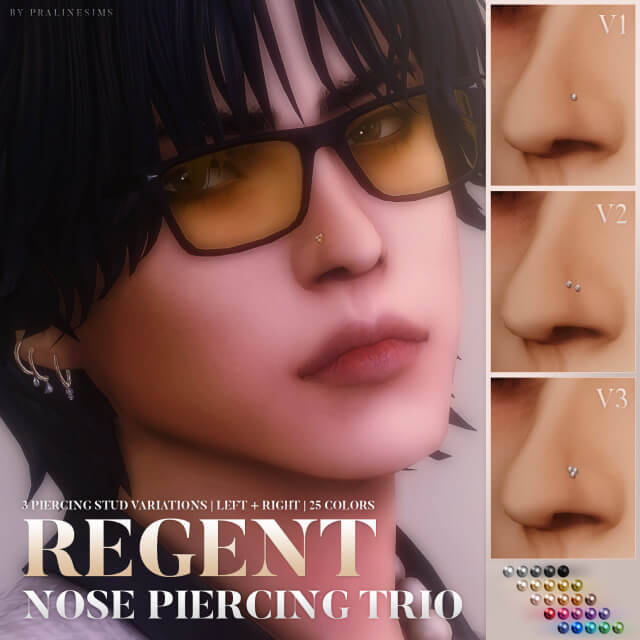
Welcome to the Regent Nose Piercing Trio—a stunning collection of small, delicate nostril stud piercings designed to bring understated glamour to your favorite Sims.
Collection Overview & Technical Details
Crafted with meticulous attention to detail, this set offers incredible flexibility for layering and styling. Here is everything you need to know about the specs:
- Variety:Available in 3 distinct styles, with each style configured for either the left or right nostril.
- Color Options:All versions come fully equipped with 25 color swatches to match any metallic preference (golds, silvers, rose golds, and more).
- Compatibility:Fully compatible with both feminine and masculine frames across Teen through Elder life stages.
- Base Game Compatible (BGC):Requires no specific packs to function.
- Catalog Location:Found conveniently under the general face accessories category.
- Performance & Quality: Optimized polycounts ranging from lightweight to highly detailed (V1 – 88 / V2 – 176 / V3 – 228 polys). It is also HQ compatible for players using high-definition texture mods.
Why You Will Love These Piercings
Standard game accessories can sometimes feel bulky or limited in placement. The Regent Nose Piercing Trio stands out for several reasons:
1. Mix-and-Match Versatility
One of the best features of this set is its modular nature. You can mix the left and right sides together, stack different styles, or seamlessly combine them with other facial piercings from the creator. Whether you want a clean single stud or a detailed multi-piercing look, the choice is entirely yours.
2. Delicate and Realistic Proportions
Designed to look dainty and realistic, these studs add a touch of modern style without overwhelming your Sim’s facial features. They catch the in-game lighting beautifully, giving your Sims an authentic, lived-in aesthetic during close-up gameplay and storytelling screenshots.
How to Install Custom Content
Adding new facial accessories to The Sims 4 takes just a few seconds:
- Check Your Game Settings: Open The Sims 4, navigate to Game Options > Other, and ensure that Enable Custom Content and Mods is checked.
- Download the Files: Download the
.packagearchive from the creator’s official page. - Move to Your Mods Folder: Place the extracted
.packagefile directly into yourDocuments > Electronic Arts > The Sims 4 > Modsdirectory. - Launch and Style: Boot up your game, head into Create-A-Sim, filter your face accessories, and give your Sims a gorgeous new piercing setup!
What kind of aesthetic are you styling your Sims with right now? Let us know your favorite accessory combinations!
Custom Content is CC that can be downloaded and added to your game
Credit : sims4ccworld