


Mods
Sims 4 The Great Palace of SimCity
Sims 4 The Great Palace of SimCity
- Department
- Lots
- Added
- 24 Nov 2021
- Updated
- 3 Jun 2022
Sims 4 The Great Palace of SimCity
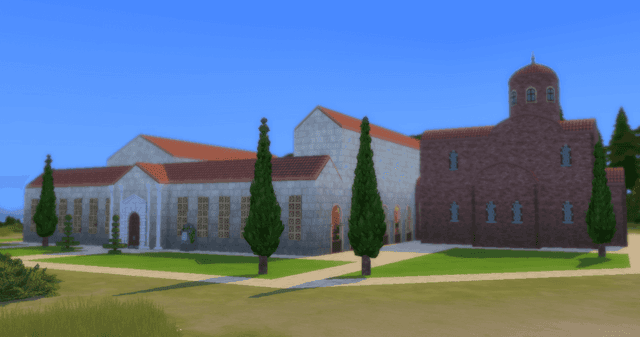
Following the same theme as my Byzantine administration career, this residential lot is based on a section of the Great Palace of Constantinople (also called the Sacred Palace). Or rather, it is based on a section of a hypothetical reconstruction of the Great Palace, which you can see in the image below. The section I mentioned is inside the red rectangle.
As it would be impossible to recreate the entire palace due to its sheer size, I had to pick an area to recreate, and so I elected this one. And since I only had the exterior reconstructions to work with, the interior had to be based on a loose interpretation of Byzantine Roman and Latin Roman architecture and homes. Mostly, that is (there's an abominable lack of proper mosaics in this game).
The lot contains the basic essential features of a residential lot - kitchen, bedrooms, and bathrooms, as well as other rooms. In any case, I'm including below a "flavourful description" of the palace complex and a bit of its history. Of course, it assumes that one is using the Byzantine administration career (currently not compatible with the latest version of TS4) and accepting its background "lore", if it can be called that.
The Great Palace of SimCity
During the Colonial period, in the site of the Great Palace stood a Peteran monastery that was later taken over by the Eastern Jacoban Church. Although the Peteran chapel was demolished and an Eastern Jacoban church was built in its place, the Jacobans were forced to leave after all religious orders were extinguished in Simladonia. The newly acclaimed emperor - Michael I Kalaphates, the son a Greek caulker who immigrated to the New World - ordered the remaining structures to be restored and to be unified into a great palace, modelled after a section of the legendary Great Palace of Constantinople. Once complete, the Great Palace was composed of three different sections - the Kyanotriklinos, the Palace of Chloris, and the Imperial Polyandreion.
The Kyanotriklinos
Translated from SimGreek as "Blue Reception Hall", the Kyanotriklinos serves both as the main imperial throne room, and as a reception hall for foreign dignitaries. Once a Eastern Jacoban church, most of its architectural and decorative elements destroyed during an earthquake. Although the outer structure was restored, the interior of the basilica suffered a complete overhaul, most of its religious architecture being removed. Whenever the emperor sits upon his throne, the highest ranked officials of the empire's palatine aristocracy sit on each side, solemn and silent until called for.
The Palace of Chloris
Named after a statue offered to Michael I sometime before his acclamation as emperor (said statue can be found in the first floor corridor), this is the imperial residence proper. The ground floor contains most basic sections of the residence - the kitchens, lounge, and office can be found here.
On the first floor, the bedrooms can be found - one for the emperor and spouse, another for the co-emperor (if there is one) and their spouse, and finally the Purple Chamber (which uses the purple-painted wood used for Michael's cabin during the War for Independence), used by the senior empress during a pregnancy. All sons of a reigning emperor born in this room are given the honorific title of "Porphyrogennetos", while daughters are instead given the female version, "Porphyrogennete". The most famous example of this can be seen with John I Kalaphates, who was popularly known as John Porphyrogennetos, even after rising to the throne.
The Imperial Polyandreion
The polyandreion ("mass grave") serves as the crypt for past emperors and their spouses. Its vaults contain the remains of all past emperors and their spouses, from the first emperor Michael I Kalaphates to Edward I Mello, the last emperor before the current interregnum.
Quote:
|
Type: Residential Size: 64x64 Furnished: 376,341 Unfurnished: 169,981 Custom Content: None Warnings:
|
Apparently, even ghost-free graves don't carry the names and epitaphs when saved to the Gallery. Which is unfortunate since each urn in the crypts had its associated Sim and the epitaphs gave a brief description of the emperors. As such, the following image will kinda "fix that", by pointing out the tomb and the respective "inhabitants".
Anyway, I hope you enjoy this build.
Archive: ColovianHastur_GreatPalace.7z
File: 0x00000002!0x01c10e19b00b09cc.trayitem
Lot
Residential
Name: Great Palace of SimCity
Description: Although part of the structure was originally a colonial Peteran monastery that was taken over by a branch of the Eastern Jacoban Church, the modern structure of the Sacred Palace was constructed in 1793 at the orders of Emperor Michael I Kalaphates. Composed of the Kyanotriklinos ("Blue Reception Hall"), the Palace of Chloris, and the Imperial Polyandreion, this great structure is the residence of whomever sits upon the imperial throne.
| Lot Details | |
| Furnished: | 376341 |
|---|---|
| Unfurnished: | 169981 |
| Size: | 64w x 64h |
| Number of Floors: | 4 |
| Bedrooms: | 3 |
Games used:
 + 19 EPs/SPs
 Get To Work
 Spa Day
 Cool Kitchen
 Get Together
 Movie Hangout Stuff
 Romantic Garden Stuff
 Vintage Glamour Stuff
 Vampires
 Jungle Adventure
 Strangerville
 Realm of Magic
 City Living
 Cats and Dogs
 Seasons
 Get Famous
 Island Living
 Discover University
 Laundry Day Stuff
 Cottage Living
 + 19 EPs/SPs
 Get To Work
 Spa Day
 Cool Kitchen
 Get Together
 Movie Hangout Stuff
 Romantic Garden Stuff
 Vintage Glamour Stuff
 Vampires
 Jungle Adventure
 Strangerville
 Realm of Magic
 City Living
 Cats and Dogs
 Seasons
 Get Famous
 Island Living
 Discover University
 Laundry Day Stuff
 Cottage Living
- Custom Content This is the addition of player-made clothing or objects to the game. Sometimes just referred to in The Sims community as “CC”.
- Game Mods: These are Mods that add features or change functionality of the game. These Mods may include script code, but not always.
- Mods: A blanket term referring to any player-made content for the game—this includes both Custom Content and Game Mods.
- Enable Mods via the options panel : The setting can be found in “Options > Other > Enable Custom Content and Mods.” and Restart the game
Follows you from page to page · saved on this device
Your outfit
0 of 5
- Hair—HairTry kali hair
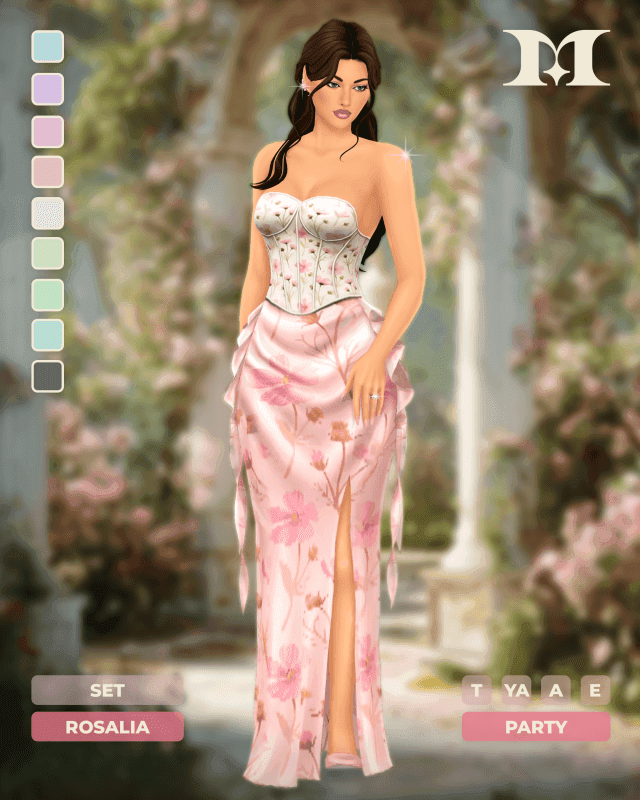
- Outfit—OutfitTry rosalia dress
- Shoes—ShoesTry The Sims 4 Rain Boots Kids (White) by Dissia
- Accessory—AccessoryTry starlight earrings
- Make-up—Make-upTry JariSimCC Lipstick 06
5 to go. Fill the empty hangers to finish the look.
from other departments
Complete the look
Hair, make-up and the small things that go with this one — all free.
 This look · Mods
rosalia dress

The Sims 4 Rain Boots Kids (White) by Dissia