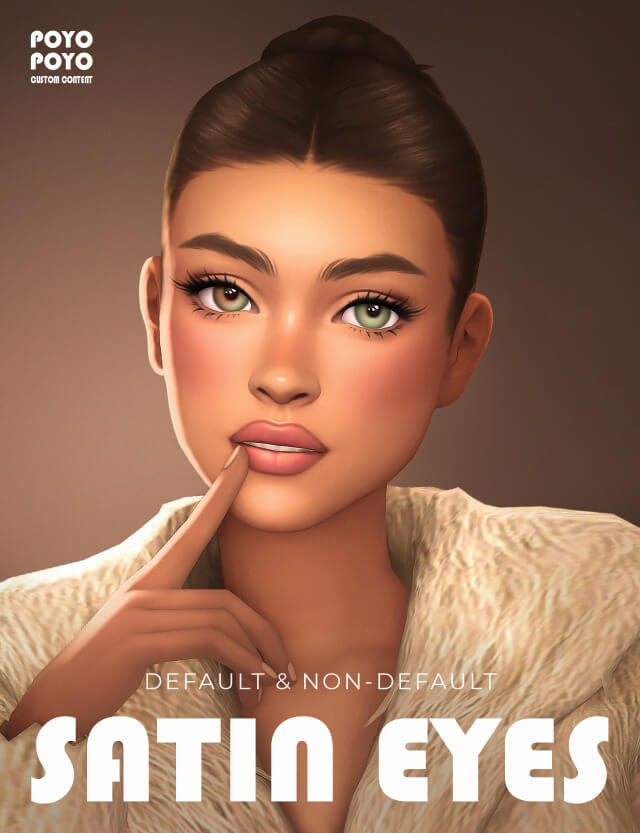
The Sims 4 Satin Eyes N21 CC: 40 Eye Colors, Default Replacements and Eye Details
Creating realistic, expressive, and memorable Sims often comes down to the smallest details. While hairstyles, clothing, and makeup can completely transform a character’s appearance, eye customization plays an equally important role. The right eye color and texture can make a Sim look softer, more mysterious, more natural, or more distinctive.
Satin Eyes N21 for The Sims 4 is an eye customization mod that gives players additional options for personalizing their Sims. With multiple Create-a-Sim categories, up to 40 swatches in its non-default versions, and compatibility across different life stages, this custom content offers flexibility for players who enjoy detailed character creation.
Unlike eye custom content that provides only one installation option, Satin Eyes N21 is offered in several formats, including Eye Details, Face Paint, Default Replacements, and Second Eye versions.
These options allow players to choose how they want to incorporate the eyes into their game, whether they prefer an alternative eye appearance, additional cosmetic options, or a replacement for the game’s standard eyes.
In this guide, we’ll explore the features of Satin Eyes N21, explain the differences between its available versions, and discuss how to install and use the custom content in The Sims 4.
What Is Satin Eyes N21 for The Sims 4?
Satin Eyes N21 is a custom eye set designed to expand the visual customization options available in The Sims 4 Create-a-Sim.
Eye custom content is popular among players who want more control over their characters’ facial appearances. The game’s original eye options provide a recognizable art style, but additional custom content can introduce different color palettes, textures, and visual effects.
Satin Eyes N21 offers several versions intended for different customization preferences.
Players can use the set through specific Create-a-Sim categories or choose a default replacement version that changes the appearance of standard eyes.
The collection also includes a Second Eye option, providing another way to customize eye appearances.
Because these versions serve different purposes, understanding their differences is important before downloading and installing the files.
Satin Eyes N21 Features and Compatibility
The eye set includes four versions with different swatch counts and age compatibility.
| Version | Swatches | Age Compatibility |
|---|---|---|
| Eye Details | 40 | All ages |
| Face Paint | 40 | All ages |
| Default Replacements | 22 | All ages |
| Second Eye | 40 | Toddler to Elder |
The creator’s specifications highlight the flexibility of the collection.
Three versions support all ages, while the Second Eye option is specifically listed for toddlers through elders.
The number of swatches also varies depending on the version.
The Eye Details, Face Paint, and Second Eye options each include 40 swatches, while the Default Replacement version includes 22.
This distinction matters because players may prefer different versions depending on how they organize their custom content and customize their Sims.
Eye Details Version: 40 Swatches for All Ages
The Eye Details version is one of the main options included in Satin Eyes N21.
It provides 40 swatches and supports Sims across all age groups.
Eye details custom content can be useful for players who prefer organizing certain facial modifications separately from standard eye color selections.
This approach may be particularly appealing if you frequently experiment with different skin details, makeup styles, and facial customization options.
Why Choose the Eye Details Version?
The Eye Details version offers a convenient way to incorporate Satin Eyes N21 into your character creation routine.
With 40 available swatches, players can experiment with different eye appearances while developing individual character designs.
This can be useful when creating large households where each Sim needs a recognizable appearance.
For example, one character might have a soft and understated look, while another might use a more distinctive eye color to reinforce their personality.
The Eye Details version is also suitable for players who regularly create Sims for screenshots, storytelling, or detailed character portraits.
However, compatibility with other eye details or skin detail modifications can depend on how individual custom content files are configured.
If two items use the same exclusive Create-a-Sim slot, they may not be usable together.
Testing your preferred combinations in Create-a-Sim is the best way to determine whether they work correctly.
Face Paint Version: Flexible Eye Customization
The Face Paint version of Satin Eyes N21 also includes 40 swatches and supports all ages.
This version places the eye appearance within the Face Paint category, providing an alternative to the Eye Details option.
Face Paint versions of custom eyes are popular because they can be convenient for players who frequently change character appearances.
Instead of relying exclusively on the standard eye color selection, players can access the custom eye design through a cosmetic category.
When Should You Use the Face Paint Version?
The Face Paint version may be a good choice if you enjoy experimenting with different looks for the same Sim.
For example, you might create a character with a natural everyday appearance and a more dramatic look for formal outfits or screenshots.
Using eye custom content through a cosmetic category can offer additional styling possibilities, depending on how the item behaves in the game.
It is important to remember that face paint is generally managed as part of an outfit’s cosmetic selections.
If you want a consistent eye appearance across multiple outfits, check each outfit category after applying the custom content.
The Face Paint version can also be useful when creating fantasy-inspired Sims, where unusual eye appearances may be an important part of the character’s design.
Default Replacement Version: 22 Swatches
The Default Replacement version of Satin Eyes N21 includes 22 swatches and supports all ages.
Unlike non-default eye options, default replacement eyes are intended to replace the appearance of the game’s original eye textures.
This makes them particularly appealing to players who want a consistent visual style throughout their saves.
Instead of selecting a custom eye appearance individually for every Sim, a default replacement can change how standard eyes appear in the game.
What Are Default Replacement Eyes?
Default replacement eyes are custom content files that override the game’s existing eye appearance resources.
They are commonly used by players who want to change the overall visual style of The Sims 4 without manually editing every character.
For example, some players prefer softer eye textures, while others enjoy more detailed or stylized designs.
Installing a default replacement allows the selected eye design to become part of the game’s standard appearance system.
However, default replacements should be managed carefully.
Can You Install Multiple Default Eye Replacements?
Generally, you should avoid installing multiple default eye replacement sets that override the same resources.
When two packages attempt to replace the same game assets, conflicts can occur.
The game may display an unexpected texture or use one replacement instead of the other.
If you already have default replacement eyes installed, remove the conflicting files before adding Satin Eyes N21 Defaults.
You can still explore other non-default eye custom content, provided the individual packages are compatible.
For more advice on organizing modifications, read our The Sims 4 Broken Mods and CC Troubleshooting Guide.
Second Eye Version: 40 Swatches for Toddler to Elder
Another option included in Satin Eyes N21 is the Second Eye version.
This version provides 40 swatches and is listed as compatible with Sims from toddlers through elders.
Unlike the other versions, it is not described as supporting every age group.
That means players should not assume it works for infants unless the creator provides additional compatibility information.
What Makes the Second Eye Version Useful?
The Second Eye version provides an additional eye customization option for players who want more variety.
Its exact behavior depends on how the creator has configured the custom content.
For that reason, it is best to check the original download instructions and preview images before installing.
The 40 swatches can be particularly useful for creating characters with distinctive appearances.
For example, players might use the eye set when designing supernatural Sims, fantasy characters, or households where eye colors play an important role in storytelling.
If you enjoy creating magical characters, our Fairy Locs by ImVikai Sims 4 Hair CC Guide explores another custom content option that can complement fantasy-inspired Create-a-Sim designs.
Why Custom Eyes Matter in The Sims 4
Eye customization may seem like a small detail, but it can have a noticeable impact on character design.
The eyes are among the most expressive parts of a Sim’s face.
When players create close-up screenshots or spend time adjusting facial features, eye appearance becomes particularly important.
Custom eyes can help reinforce a character’s personality, visual theme, or family resemblance.
More Distinctive Characters
Using additional eye swatches can help distinguish Sims from one another.
This is especially useful for players who create large households or populate entire worlds with custom characters.
Even when Sims share similar hairstyles or facial structures, different eye appearances can contribute to their individuality.
Better Character Portraits
Players who enjoy Create-a-Sim photography often pay close attention to facial details.
Eye textures, colors, and surrounding makeup can influence the overall mood of a portrait.
A carefully chosen eye appearance can help create a cohesive character design, especially when paired with suitable lighting and complementary facial details.
Greater Creative Freedom
One of the biggest advantages of custom content is the freedom to experiment.
The Sims 4 provides a recognizable visual foundation, but custom content allows players to explore different aesthetics.
Satin Eyes N21 contributes to that flexibility by offering several versions rather than a single fixed option.
How to Choose the Right Satin Eyes N21 Version
With four available versions, choosing the right one depends on how you prefer to customize your Sims.
If you want access to the eye design through a facial detail category, the Eye Details version may be suitable.
If you prefer applying the eye appearance through a cosmetic category, consider Face Paint.
If your goal is to change the game’s standard eye appearance, the Default Replacement version is the most relevant option.
The Second Eye version provides another alternative for players interested in additional eye customization, with its stated compatibility extending from toddlers through elders.
Before installing multiple versions, check the creator’s instructions to determine whether they can be used together.
Although the versions are listed separately, that does not automatically guarantee that every combination will work without conflicts.
How to Download and Install Satin Eyes N21
Installing eye custom content follows a process similar to installing hairstyles, clothing, and other Create-a-Sim modifications.
The most important step is downloading the files from the original creator or an authorized source.
Because the supplied release information does not identify the creator or include an official download URL, you should verify the original Satin Eyes N21 post before downloading.
Avoid downloading unfamiliar files from websites that redistribute custom content without permission.
Step 1: Choose Your Preferred Version
Decide whether you want Eye Details, Face Paint, Default Replacements, or Second Eye.
Review the swatch counts and age compatibility before downloading.
If you already use custom eyes, consider whether the new files might overlap with existing modifications.
Step 2: Download the Files
Download the appropriate package files from the creator’s official release page.
Some creators distribute multiple versions together, while others provide separate downloads.
Follow the instructions provided with the release.
Step 3: Extract the Archive
If the download is provided as a ZIP or RAR archive, extract it using a compatible program.
Standard Sims 4 custom content generally uses the .package file format.
Step 4: Install the Package Files
For a typical Windows installation, the Mods folder is located at:
Documents/Electronic Arts/The Sims 4/Mods
Move the package files into this directory.
You can create a separate folder for eye custom content to keep your files organized.
Step 5: Enable Custom Content
Launch The Sims 4 and open Game Options.
Navigate to the Other settings and enable Custom Content and Mods.
Restart the game after applying the changes.
Step 6: Check the Eyes in Create-a-Sim
Open Create-a-Sim and locate the installed eye content in the appropriate category.
For the Eye Details and Face Paint versions, check the corresponding customization sections.
If you installed the Default Replacement version, examine the standard eye options to see whether the replacement is working.
Test the appearance on different Sims and life stages to confirm that the files behave as expected.
How to Fix Satin Eyes N21 If It Does Not Work
Occasionally, eye custom content may not appear correctly after installation.
Common problems include missing textures, conflicting default replacements, disabled custom content settings, and incorrectly installed files.
Start by confirming that the package files are in your Mods folder.
Next, verify that custom content is enabled in the game settings.
If you installed the Default Replacement version, check for other default eye packages that may override the same resources.
You can also temporarily remove recently installed eye modifications to identify possible conflicts.
If the problem appeared after a game update, visit the creator’s release page to check whether an updated version is available.
For persistent issues, try testing the custom content in a clean Mods folder with only the necessary files installed.
This can help determine whether the problem comes from the eye set itself or another modification.
Best Create-a-Sim Ideas for Satin Eyes N21
Satin Eyes N21 can be incorporated into several character concepts.
Natural Everyday Sims
For everyday characters, choose eye colors that complement the Sim’s overall appearance.
Pair the eyes with simple makeup, casual clothing, and a hairstyle that suits the character’s personality.
If you prefer short, contemporary hairstyles, check out our Teyana Curly Pixie by ImVikai for The Sims 4 guide for another Create-a-Sim customization option.
Fantasy and Supernatural Characters
Custom eyes can also be useful for fantasy-inspired Sims.
Players can experiment with different eye colors and combine them with dramatic makeup, unusual hairstyles, or themed outfits.
The specific effects available depend on the actual swatches included in Satin Eyes N21.
For gothic-inspired fashion ideas, our SENTATE Banshee Collection Sims 4 Guide explores Victorian-inspired clothing that can complement mysterious character designs.
Family and Legacy Challenge Sims
Eye customization can become an interesting part of long-term storytelling.
For example, you might establish a recognizable eye appearance for a particular family.
When creating descendants or editing household members, you can use consistent visual details to reinforce the family’s identity.
Keep in mind that cosmetic custom content does not necessarily affect genetic inheritance in the same way as standard eye color settings.
Its behavior depends on the version installed and how the game handles that category.
Is Satin Eyes N21 Worth Downloading?
Satin Eyes N21 is worth considering if you enjoy spending time in Create-a-Sim and want more control over your characters’ eye appearances.
The availability of four versions is one of its most useful features.
Players can choose between Eye Details, Face Paint, Default Replacements, and Second Eye options depending on their preferred customization method.
The 40-swatch non-default versions offer a broad selection, while the 22-swatch Default Replacement version provides an alternative for players who want to change the game’s standard eye appearance.
Age compatibility is another advantage, especially for players who regularly create families across multiple generations.
However, it is important to select the appropriate version and check for conflicts with existing eye custom content.
Players who only want a simple additional eye option may prefer a non-default version, while those seeking a more consistent replacement for standard eyes may find the Defaults version more appropriate.
Final Thoughts
Satin Eyes N21 for The Sims 4 offers a flexible collection of eye customization options for players who want to personalize their characters beyond the game’s standard selections.
With 40 swatches in the Eye Details, Face Paint, and Second Eye versions, plus 22 swatches in the Default Replacement version, the set provides several approaches to eye customization.
Its age compatibility also makes it useful for creating Sims across different life stages, although the Second Eye version is specifically listed for toddlers through elders.
Whether you’re designing realistic everyday characters, fantasy-inspired Sims, or detailed portraits, custom eyes can help establish a more distinctive appearance.
Before downloading, make sure you locate the original creator’s release, choose the version that best suits your needs, and check for conflicts with existing eye replacements.
For players who enjoy experimenting with facial details and building unique characters, Satin Eyes N21 is a custom content release worth exploring.
Custom Content is CC that can be downloaded and added to your game
Credit : sims4ccworld